

Security Defaults – On/Off? (Context Is Key)
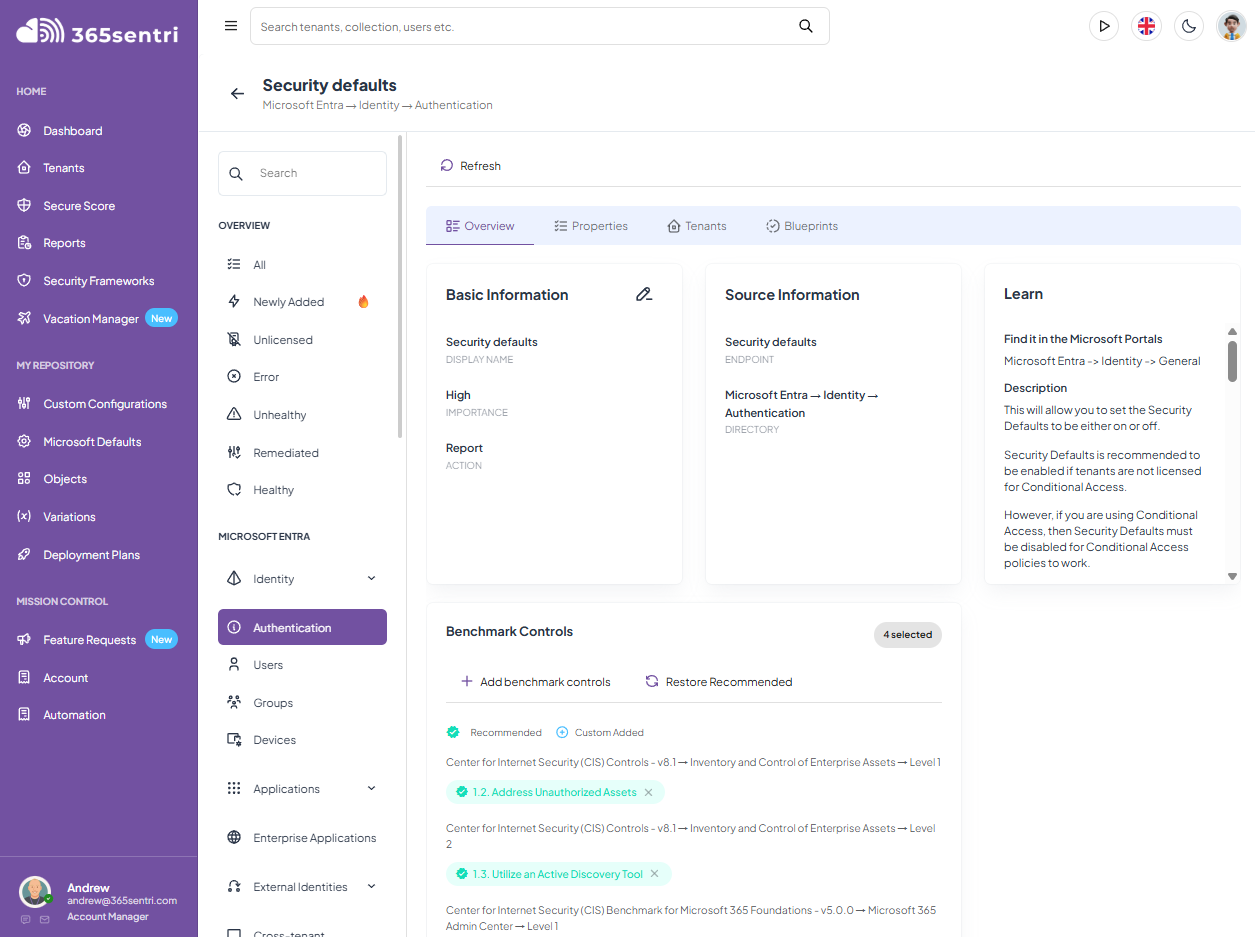
Some of the Microsoft 365 Tenants who have acquired the Business Premium license we see are still running on Security Defaults.
The customer has either just bought, or has already bought Conditional Access as part of their license. This is a great thing.
It comes with Entra ID P1, which is included in Business Premium.
The licence is sitting there. The implementation is just pending rollout.
Security Defaults is a useful floor
So what are Security Defaults? And do I need them?
Microsoft made Security Defaults available to every Entra tenant because plenty of organisations had no meaningful identity protection at all.
They also didn’t have the benefit of the Business Premium License.
Security Defaults requires MFA registration, requires administrators to perform MFA, challenges users when Microsoft decides it is necessary, sometimes blocks legacy authentication and protects privileged access.
New tenants using Security Defaults also have device code flow blocked. That is a bit hit and miss, and sometimes you don’t really know who has it and doesn’t.
For an organisation running Entra ID Free with simple requirements, it should almost always be switched on.
There is very little to manage. That is the point.
You also get very little control.
There are no pilot groups, customer-specific exclusions, authentication strengths or device-compliance conditions. You cannot give administrators, staff and guests different access requirements.
The tenant gets the Microsoft-managed package.
Business Premium changes the job and it changes the Security Stakes
As of time of writing, June 2026, Business Premium gives the customer Entra ID P1.
That unlocks Conditional Access and lets you decide who can access Microsoft 365, which resources they can reach and what they need to prove before access is granted.
You can require stronger authentication for administrators.
Staff can have a different policy path. Guests can be restricted separately. Access can depend on device compliance, application, location and client type.
Jonathan Edwards, The Bearded 365 Guy someone who we have worked with, has described Conditional Access as “one of the most powerful and misunderstood features in Microsoft 365”.
That tracks with what we see.
Some tenants have no Conditional Access policies at all. And they have Security Defaults off….
Others have accumulated 20 policies with inconsistent names, Block <Country A> – In report mode. overlapping assignments and exclusions nobody can explain.
More policies do not automatically produce better control.
Build around the people using the tenant
Jonathan’s approach is one that we agree with here. He starts with baseline CA policies and clear personas that are easily understood.
Administrators, staff and guests do different things. They carry different risk and should not automatically travel through the same access path.
Administrators need stronger authentication and tighter access to management portals.
Staff need controls that protect the tenant without turning ordinary work into a support ticket.
Guests need access to the resources they were invited to use, with proper authentication and fewer assumptions about the device they arrive on.
Emergency access accounts need their own treatment. Microsoft recommends two cloud-only emergency accounts (we call them Break Glass Accounts) that remain available when normal authentication or Conditional Access fails.
If those accounts sit inside every restrictive policy, they are useless at the exact moment you need them.
Conditional Access depends on the work underneath it
A policy requiring a compliant device only works when device management is ready.
The devices need to be enrolled. Compliance policies need to exist. The organisation needs to decide how personal devices, contractors and unsupported endpoints will be handled.
This is why Business Premium security cannot be deployed as a bag of unrelated features and it cannot be deployed like throwing a big rock into a small pond.
Identity, Intune, device configuration, endpoint protection, compliance and Conditional Access depend on each other.
Our Business Premium – Essentials blueprint follows that principle.
Establish the identity and device foundations, define compliance, then use Conditional Access to enforce the decisions.
Requiring compliant devices before the devices can become compliant is a fairly efficient way to lock out the customer and fill up your inbox and phone lines.
Moving away from Security Defaults needs a plan
Security Defaults and Conditional Access are separate policy paths. Microsoft does not intend them to operate together.
Before switching, check the authentication methods already registered by users. Find applications still using legacy authentication. Create and test the emergency access accounts.
Decide how administrators, staff, guests and service accounts will be handled.
We have reports for that.
Then map the Conditional Access policies that will replace the protections Security Defaults was providing.
Probably not a good idea to disable Security Defaults and leave the tenant unprotected while someone spends the next week writing policies.
Make the change during a controlled window and put the replacement baseline in place immediately using a staged blueprint rollout.
Use report-only mode for the additional policies. Review actual sign-ins, run pilot users through them and find the exceptions before enforcement.
Microsoft recommends the same approach: report-only, pilot groups, registered authentication methods and tested emergency access.
One good tenant does not give you a fleet baseline
An MSP can build a good Conditional Access setup for one customer.
The next customer has different groups, different emergency accounts and a line-of-business application that still sends email like it is 2009.
By customer number 20, each engineer has built their own version.
That is the standardisation problem that exists in the industry. Every engineer needs the same baseline, the same deployment decisions and a way to prove what was done within the MSP.
365sentri carries the baseline in a Business Premium – Essentials deployment blueprint.
The standard policies remain consistent. Variations hold the details that genuinely differ, such as emergency accounts, groups and exclusions.
Deployment plans stage the work rather than pushing every control into enforcement at once.
After deployment, recurring checks show whether the policies remain in the expected state.
Buying Business Premium gives the customer the tools.
Deploying and maintaining them is the service.
Once you’ve got everyone onto a baseline that you are happy with, work with us on your Blueprint to uplift it and make things even better for your customers.
Still running Security Defaults across Business Premium tenants?
Bring us the tenant count, the policies you want to deploy and the customer-specific differences you already know about. We can show you how 365sentri stages, applies and monitors the Conditional Access baseline across the fleet.