Your priorities shape what 365sentri becomes
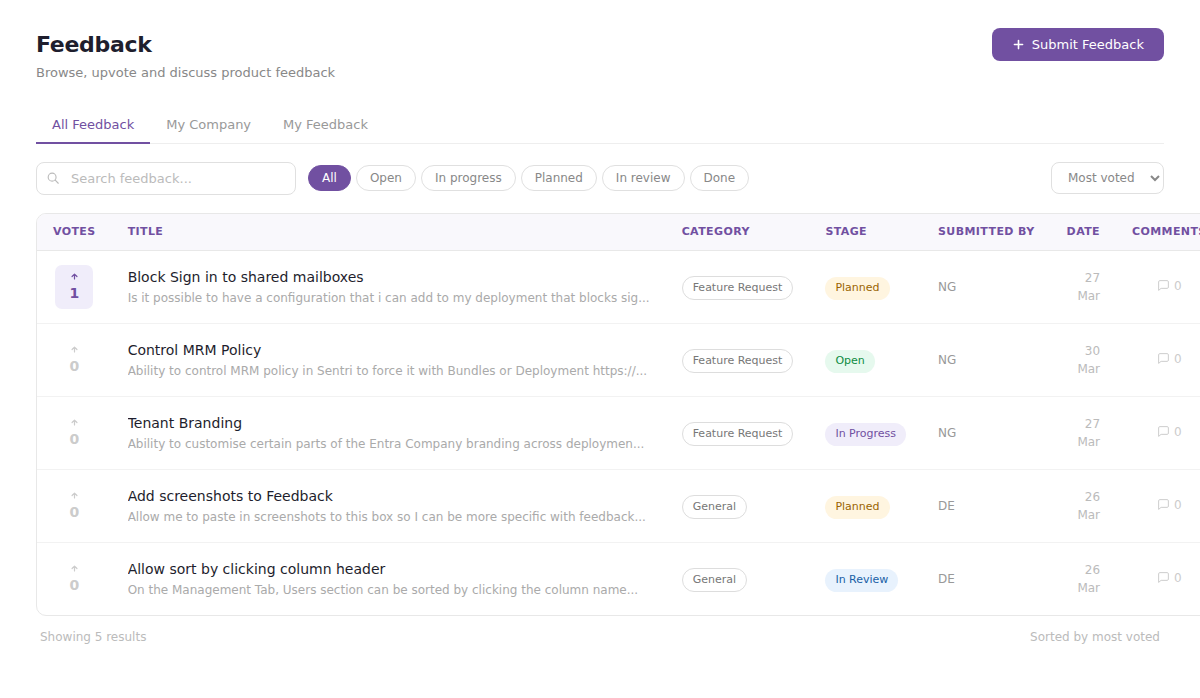
We’ve just shipped something we think changes how you interact with 365sentri – a built-in feedback and feature request system.
This isn’t a suggestion box that goes nowhere. It’s a direct line into our product roadmap – and the features with the most votes get built first.
Shape what we build
Submit ideas and bugs
Got an idea for a new report, integration, or workflow? Found something that doesn’t work the way it should? Submit it directly from the app. Categorise it, describe the problem, and we’ll take it from there.
Upvote to set priorities
Every request has an upvote button. The more votes a request gets, the higher it climbs in our priority list. Your vote directly influences what we work on next.
Browse what other MSPs want
See what the community is asking for, filter by stage or category, and find requests worth rallying behind. Someone may have already asked for exactly what you need – just upvote it.
Stay in the loop
Track progress in real time
Every request moves through clear stages – Open, In Review, Testing, Done. You’ll always know where things stand without having to ask.
Join the conversation
Each request has a comment thread where you can add context, share use cases, or ask questions. Our team responds directly – you’ll see admin replies clearly labelled so you always know when you’re hearing from us.
Be the first to know
When something you’ve submitted moves to Done, you’ll know about it
No more wondering whether that thing you asked for ever got built
Getting started
Head to Account → Feature Requests in the sidebar. All users on your account can access it.
A few things worth knowing:
- Your company name is visible to your own team, but other MSPs only see your initials – so you can be candid.
- Filter between All Feedback, My Company, and My Feedback to find what’s relevant.
- Sort by Most Voted to see what the community cares about most.
Technical Enablement
Our team can help you understand how to properly utilise this configuration
Book a Tech Call