

Welcome to our second product update for March 2026 and it is a good one…
Live Now: 14 New Reports
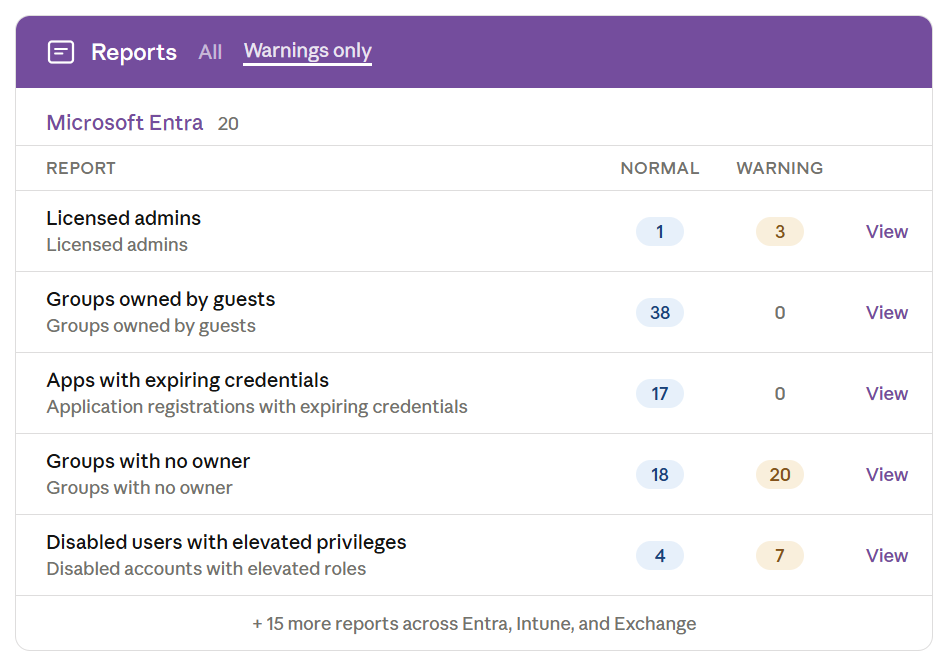
We have been expanding 365sentri’s reporting engine and are excited to share a big update – 14 new Microsoft Entra reports are now live, alongside the existing reports you already have across Entra, Intune, and Exchange Online.
These new reports give you deeper cross-tenant visibility into identity, group, and application risks – the areas MSPs tell us they spend the most time chasing manually.
We are also adding an EU region alongside our existing US and AU options, more details on that coming soon.
Microsoft Entra
14 new reports!
Licensed Admins
Privileged accounts with mailboxes are exposed to phishing and business email compromise. This report helps you identify admin accounts that should be unlicensed to reduce that attack surface.
Groups Owned by Guests
Guest owners can manage group membership, meaning an external user could add themselves or others to security groups, Teams, or distribution lists without admin oversight.
Disabled App With Owner
If a regular user is listed as the owner of a disabled app, they can re-enable it without needing admin rights – potentially restoring API permissions and consent grants that were intentionally revoked.
New App Registrations
Newly registered apps can introduce consent grants and API permissions that bypass normal access controls. Catching these early lets you review and revoke before they become a risk.
New Enterprise Apps
New service principals may have been provisioned through user consent or third-party onboarding. Without review, these can hold broad delegated or application permissions across the tenant.
Apps with Expiring Credentials
When an application secret or certificate expires, the integration silently breaks. This report gives you lead time to rotate credentials before an outage turns into a support call.
Groups with No Owner
Ownerless groups have no one accountable for membership reviews. Over time they accumulate stale members and become a source of unintended access.
Groups with Service Principal Owner
When automation is the sole owner of a group, there is no human accountable for reviewing membership or access changes. Worth flagging to ensure a person is in the loop.
Newly Created Groups
New groups may have been created by end users or automation. This report lets you verify they are intentional, properly scoped, and following your client’s naming and classification policies.
Groups Soft Deleted
Groups in the soft-delete window can still be restored. This gives you a safety net to recover accidentally deleted groups before the 30-day retention expires.
Groups Restored Recently
When a group is restored, its original membership and permissions come back with it. Tracking restores helps you catch unintended access reinstatement.
Groups Without Sensitivity Labels
If your client enforces information protection policies, unlabelled groups are a gap. This report identifies them so you can apply the correct classification.
Disabled Users With Elevated Privileges
Disabled accounts that still hold admin roles are a latent risk. If re-enabled – accidentally or by a bad actor – they immediately regain privileged access without any additional approval.
Tenants Without Entra P1 / P2 / Tenants with Entra Free
These three views help you spot tenants that lack the licensing needed for Conditional Access (P1), or Identity Protection and Privileged Identity Management (P2). Useful for upsell conversations and ensuring baseline security controls are in place.
Technical Enablement
Our team can help you understand how to properly utilise this configuration
Book a Tech Call